SmartIntellect
Redesigning a CDP for cross border merchants
B2B
B2B
SaaS Product Design
SaaS Product Design
Industry
Cross-Border E-commerce
Company
SHOPLINE in JOYY Inc
Timeline
2024.06 - 2024.09 (3 months)
My Role
Product Designer
Tools
Figma, Jira, Notion, Zoom
Business Impact
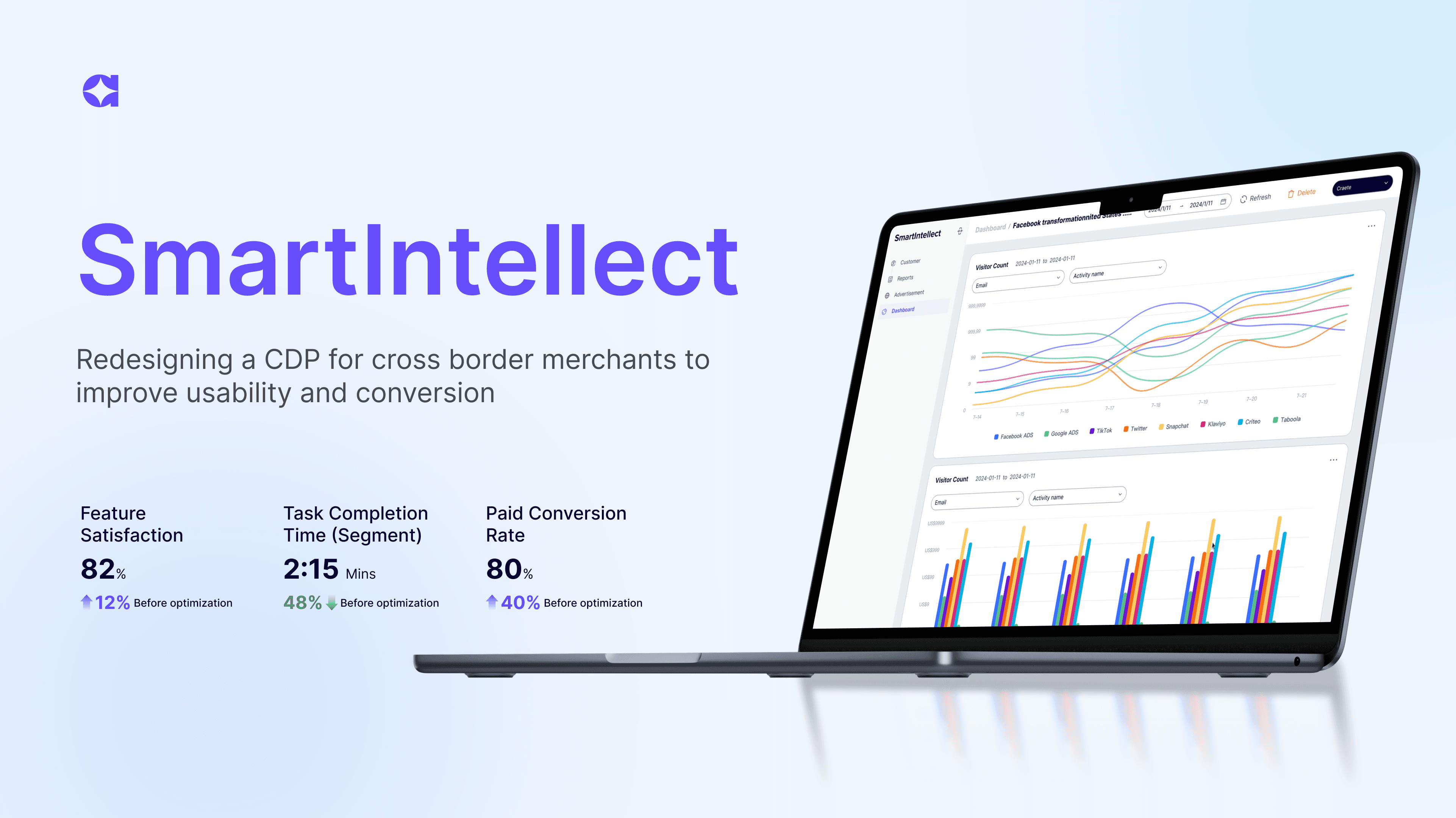
40% Paid Conversion Rate
SmartIntellect is a customer data platform for merchants on SHOPLINE. A merchant’s customer data lives in three or four places at once — their storefront, Google, social channels — and none of them talk to each other. SmartIntellect pulls those sources into one profile per customer, so merchants can see behavior, purchase history, and ad performance in a single view, then act on it with targeted campaigns.
SmartIntellect is a customer data platform for merchants on SHOPLINE. A merchant’s customer data lives in three or four places at once — their storefront, Google, social channels — and none of them talk to each other. SmartIntellect pulls those sources into one profile per customer, so merchants can see behavior, purchase history, and ad performance in a single view, then act on it with targeted campaigns.
SmartIntellect is a customer data platform for merchants on SHOPLINE. A merchant’s customer data lives in three or four places at once — their storefront, Google, social channels — and none of them talk to each other. SmartIntellect pulls those sources into one profile per customer, so merchants can see behavior, purchase history, and ad performance in a single view, then act on it with targeted campaigns.
Overview
Overview
The Problem
The Problem
The product launched its MVP, but people weren’t willing to pay for it
The product launched its MVP, but people weren’t willing to pay for it
SmartIntellect was built to help merchants drive sales and conversions more efficiently. It launched its MVP and passed basic market validation. But even though most merchants saw its value, very few were actually willing to pay for it.
SmartIntellect was built to help merchants drive sales and conversions more efficiently. It launched its MVP and passed basic market validation. But even though most merchants saw its value, very few were actually willing to pay for it.
Why it happened
Why it happened
There are three factors that design can help improve
There are three factors that design can help improve
In research, most merchants felt the product was difficult to use, missing essential features, and visually inconsistent, leading to high learning costs and low operational efficiency.
In research, most merchants felt the product was difficult to use, missing essential features, and visually inconsistent, leading to high learning costs and low operational efficiency.
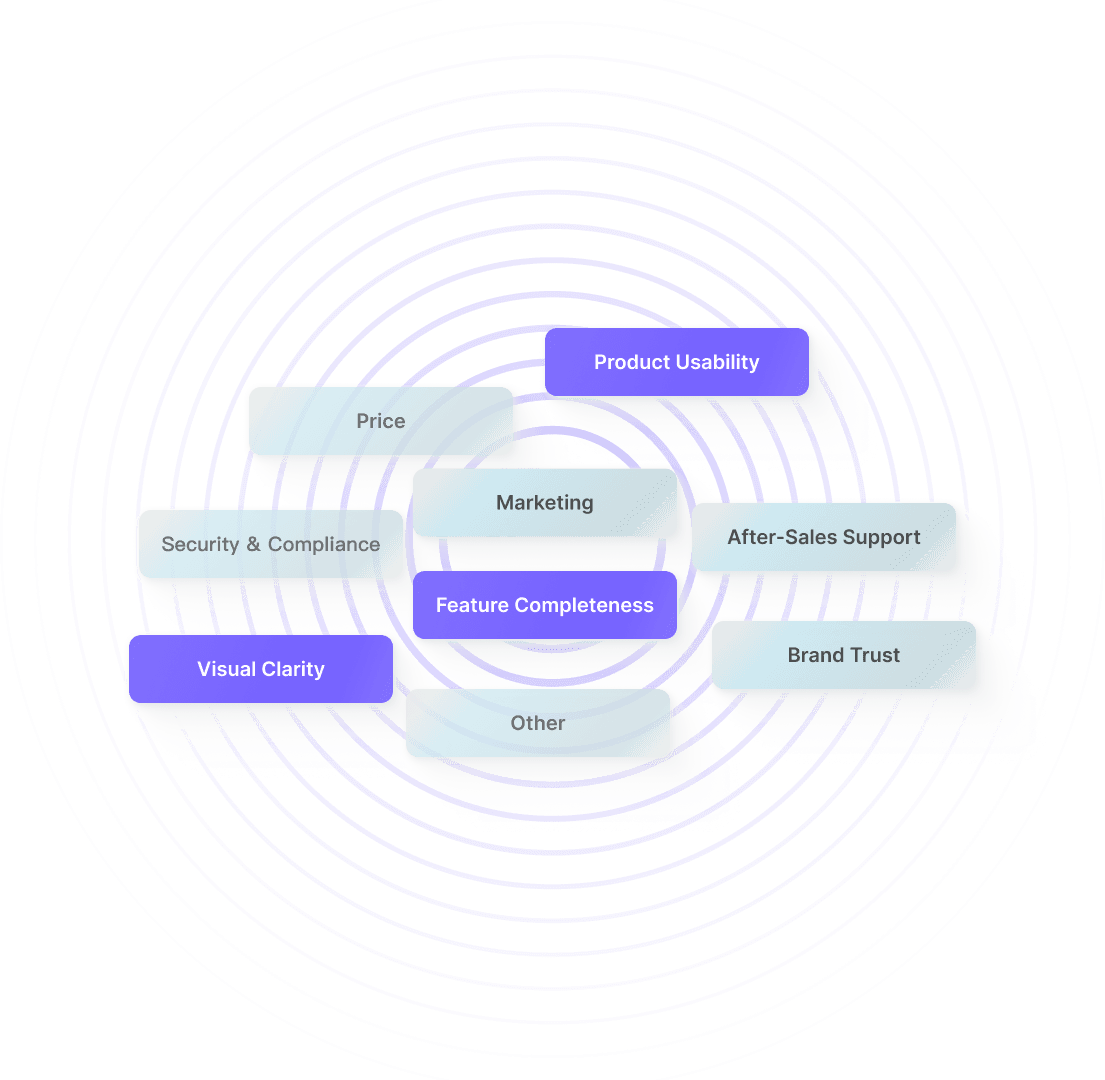
Key factors merchants consider when subscribing to the CDP product
What I did
What I did
Streamlined workflows, added new features, and rebuilt the design system
Streamlined workflows, added new features, and rebuilt the design system
After identifying these needs, I conducted competitive analysis and mapped design strategies.
I streamlined workflows and prompts to lower the learning curve, introduced new features such as a dashboard to expand product value, and rebuilt the design system with guidelines and reusable components.
After identifying these needs, I conducted competitive analysis and mapped design strategies.
I streamlined workflows and prompts to lower the learning curve, introduced new features such as a dashboard to expand product value, and rebuilt the design system with guidelines and reusable components.
Impact
Impact
The redesigned version lifted merchant paid conversion by 40%
The redesigned version lifted merchant paid conversion by 40%
Merchant satisfaction reached 80% for usability and 79% for completeness, while tasks such as creating segments and comparing data were completed in nearly half the time.
Merchant satisfaction reached 80% for usability and 79% for completeness, while tasks such as creating segments and comparing data were completed in nearly half the time.
The redesign drove a 40% lift in merchant paid conversion, with 7 of 9 trial participants converting to paid users.
The redesign drove a 40% lift in merchant paid conversion, with 7 of 9 trial participants converting to paid users.
12%
Feature Satisfaction
(Design Value)
48%
Task Completion Time
(Design Value)
40%
Paid Conversion Rate
(Business Impact)
Archetype Mapping
Archetype Mapping
Business Operators and Data Analysts
Business Operators and Data Analysts
To better understand how users work with our product, I identified Business Operators and Data Analysts as the core target users, and focused my research on their key tasks, needs, and pain points.
To better understand how users work with our product, I identified Business Operators and Data Analysts as the core target users, and focused my research on their key tasks, needs, and pain points.
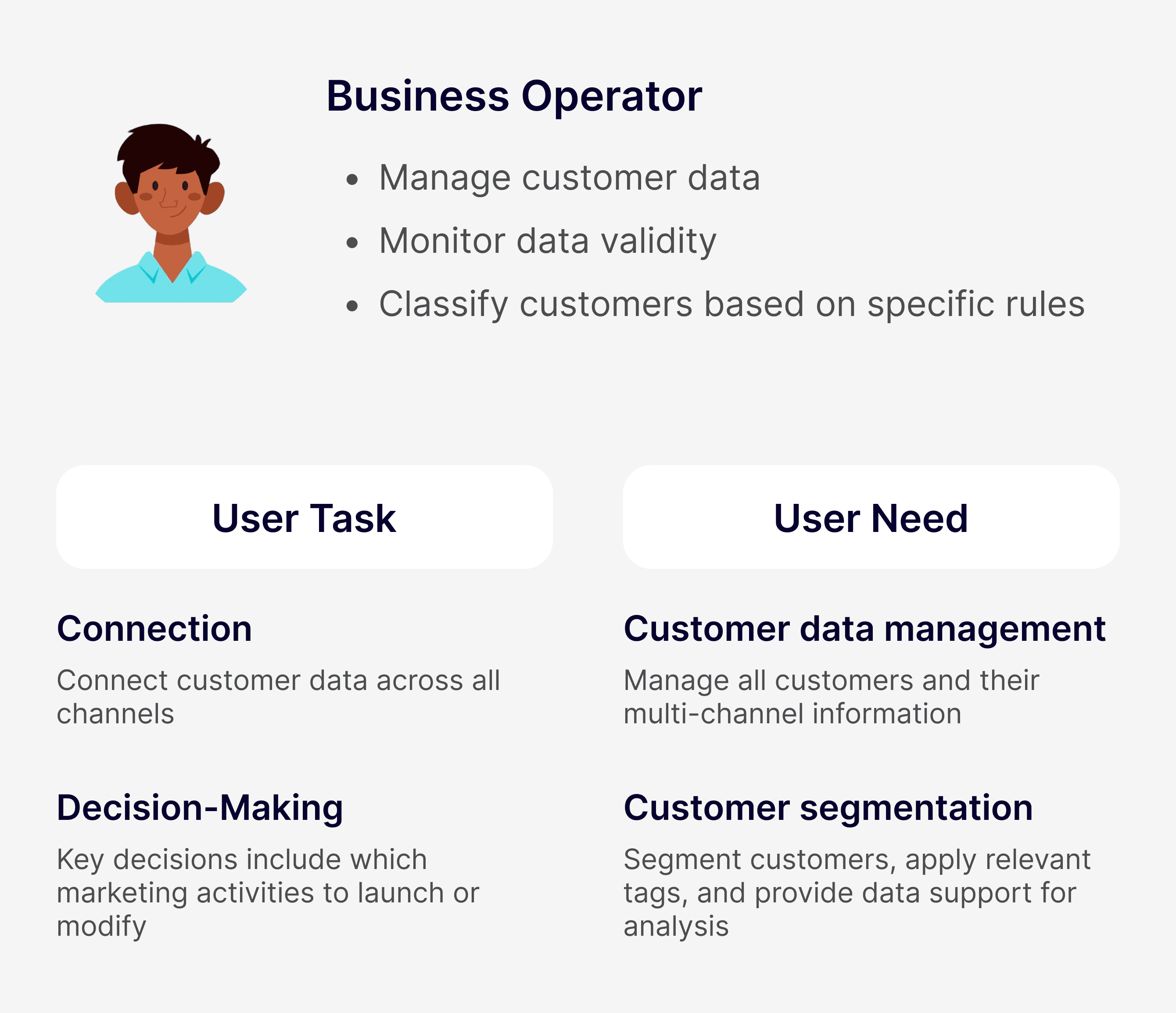
Target user 01
Business Operator
Needs fast execution, clear steps, and immediate feedback.
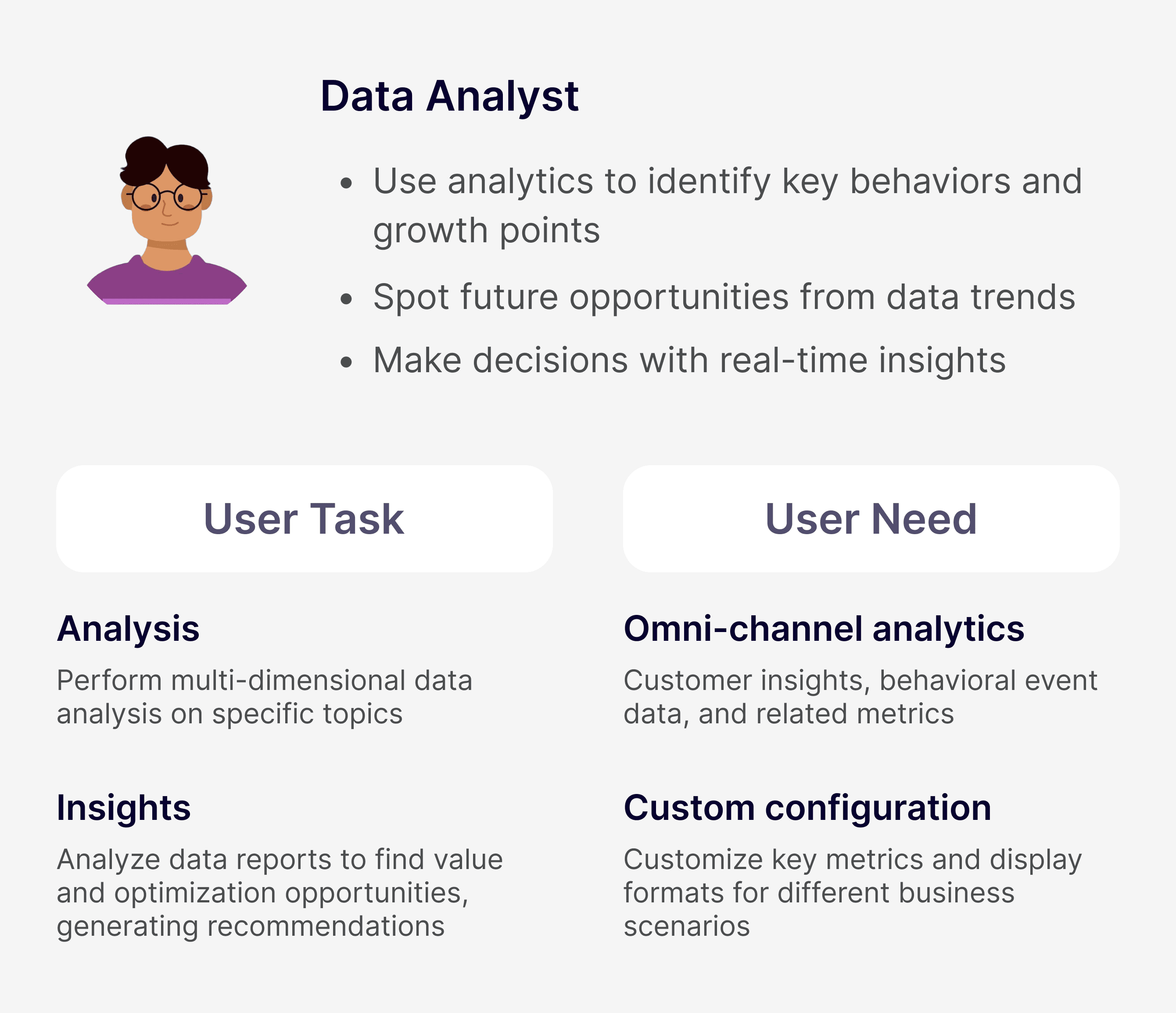
Target user 02
Data Analyst
Needs accuracy, flexible customization, and real-time data.
Target user 01
Business Operator
Needs fast execution, clear steps, and immediate feedback.
Target user 02
Data Analyst
Needs accuracy, flexible customization, and real-time data.
Target user 01
Business Operator
Needs fast execution, clear steps, and immediate feedback.
Target user 02
Data Analyst
Needs accuracy, flexible customization, and real-time data.
Target user 01
Business Operator
Needs fast execution, clear steps, and immediate feedback.
Target user 02
Data Analyst
Needs accuracy, flexible customization, and real-time data.
Core target users
Core target users
By analyzing the tasks and needs of these two key roles across different scenarios and integrating previous research findings, I identified two key scenarios: Customer Management and View Analytics Reports.
By analyzing the tasks and needs of these two key roles across different scenarios and integrating previous research findings, I identified two key scenarios: Customer Management and View Analytics Reports.
Scenario Analysis I
Scenario Analysis I
In the Customer Management scenario
In the Customer Management scenario
Users require smooth, efficient flows and clear feedback
Users require smooth, efficient flows and clear feedback
In the Customer Management scenario, the business operator is the primary user. They focus on connecting customer data to SmartIntellect, as well as viewing, managing, and editing that data.
In the Customer Management scenario, the business operator is the primary user. They focus on connecting customer data to SmartIntellect, as well as viewing, managing, and editing that data.
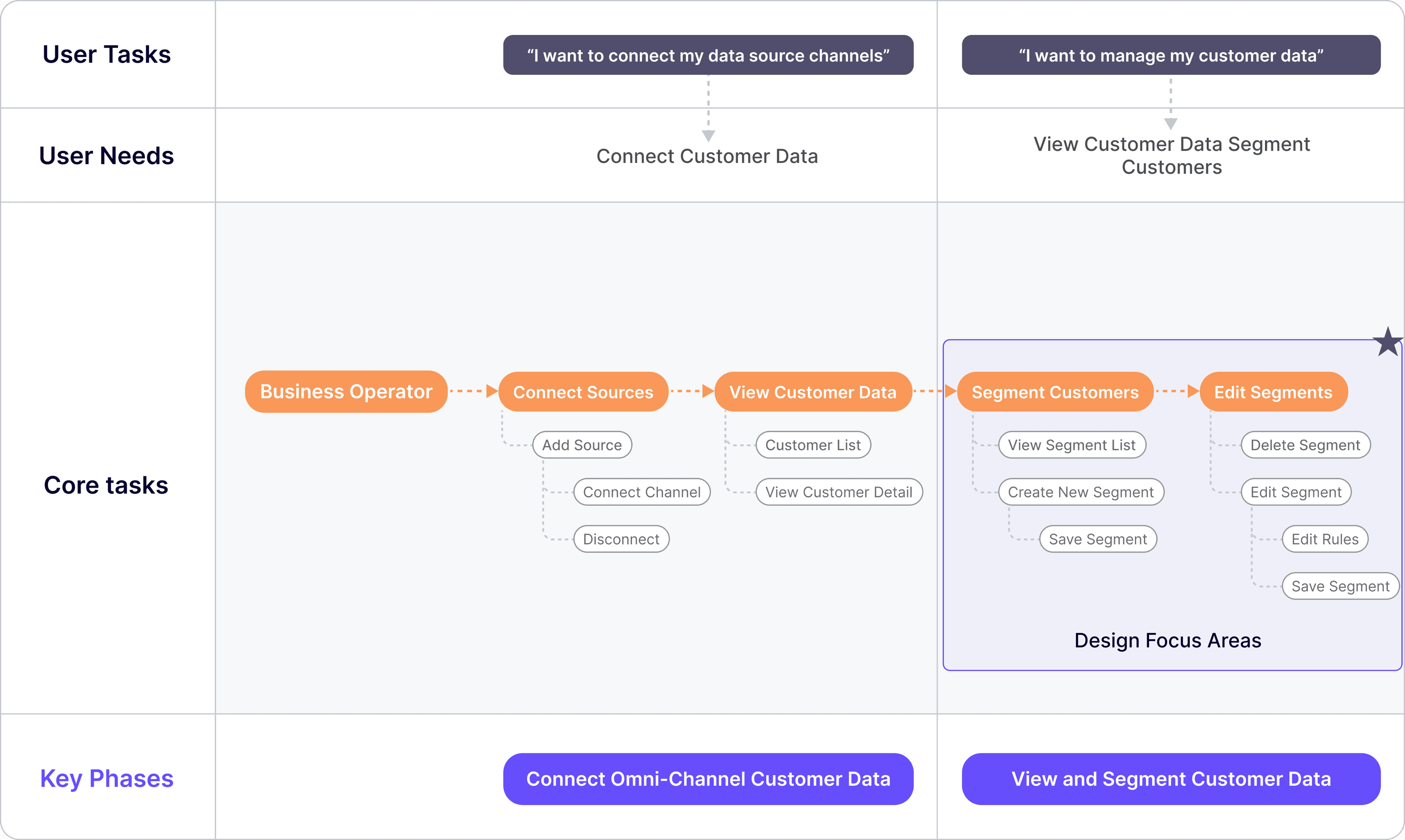
User journey map: Customer Management
User journey map: Customer Management
Problem I
Problem I
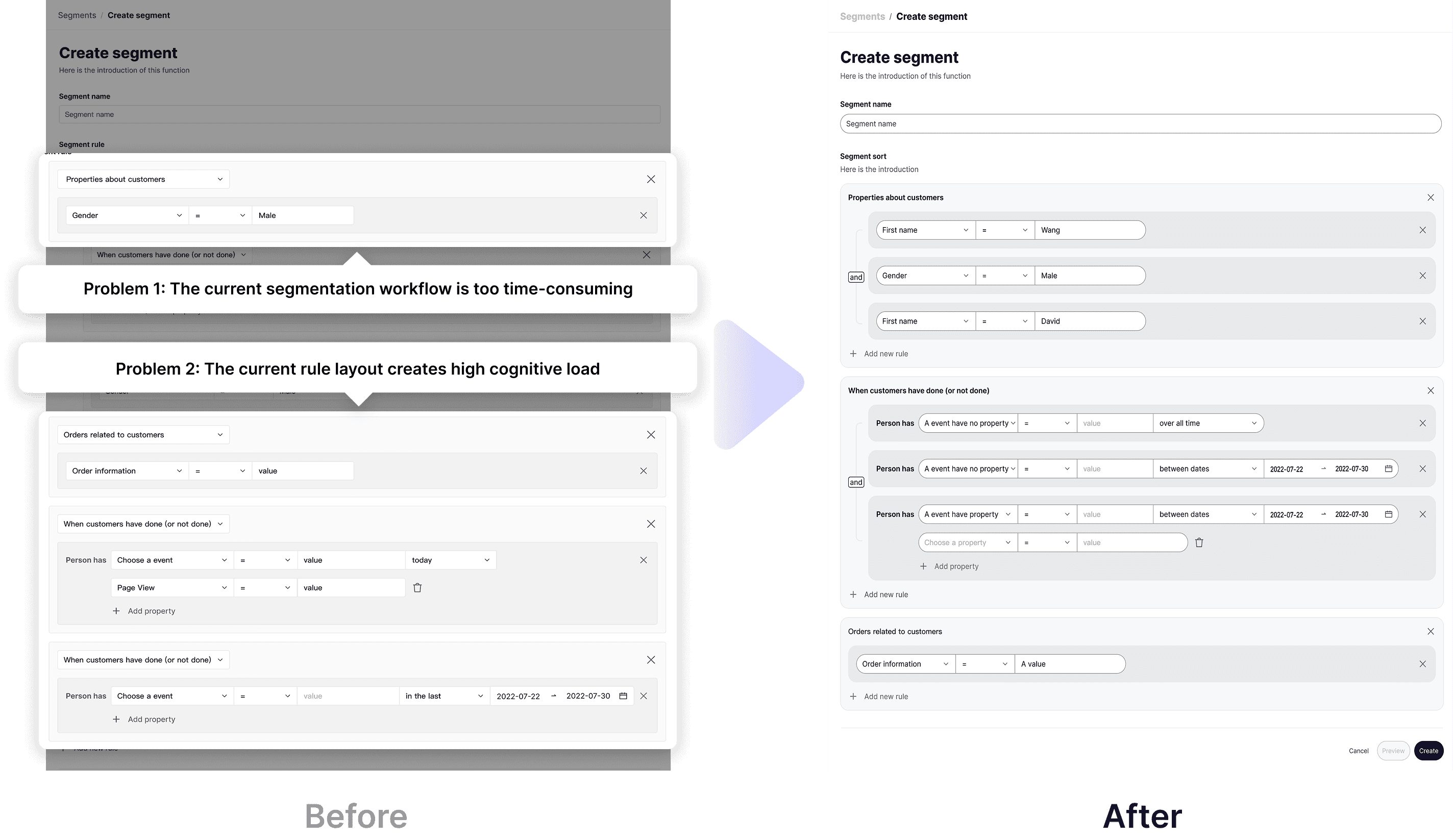
The current segmentation workflow is too time-consuming for operators
The current segmentation workflow is too time-consuming for operators
Although the current process allows them to fulfill the requirement of creating new customer segments, it is widely regarded as overly cumbersome. Operators often need to repeatedly make selections, leading to a prolonged process.
Although the current process allows them to fulfill the requirement of creating new customer segments, it is widely regarded as overly cumbersome. Operators often need to repeatedly make selections, leading to a prolonged process.
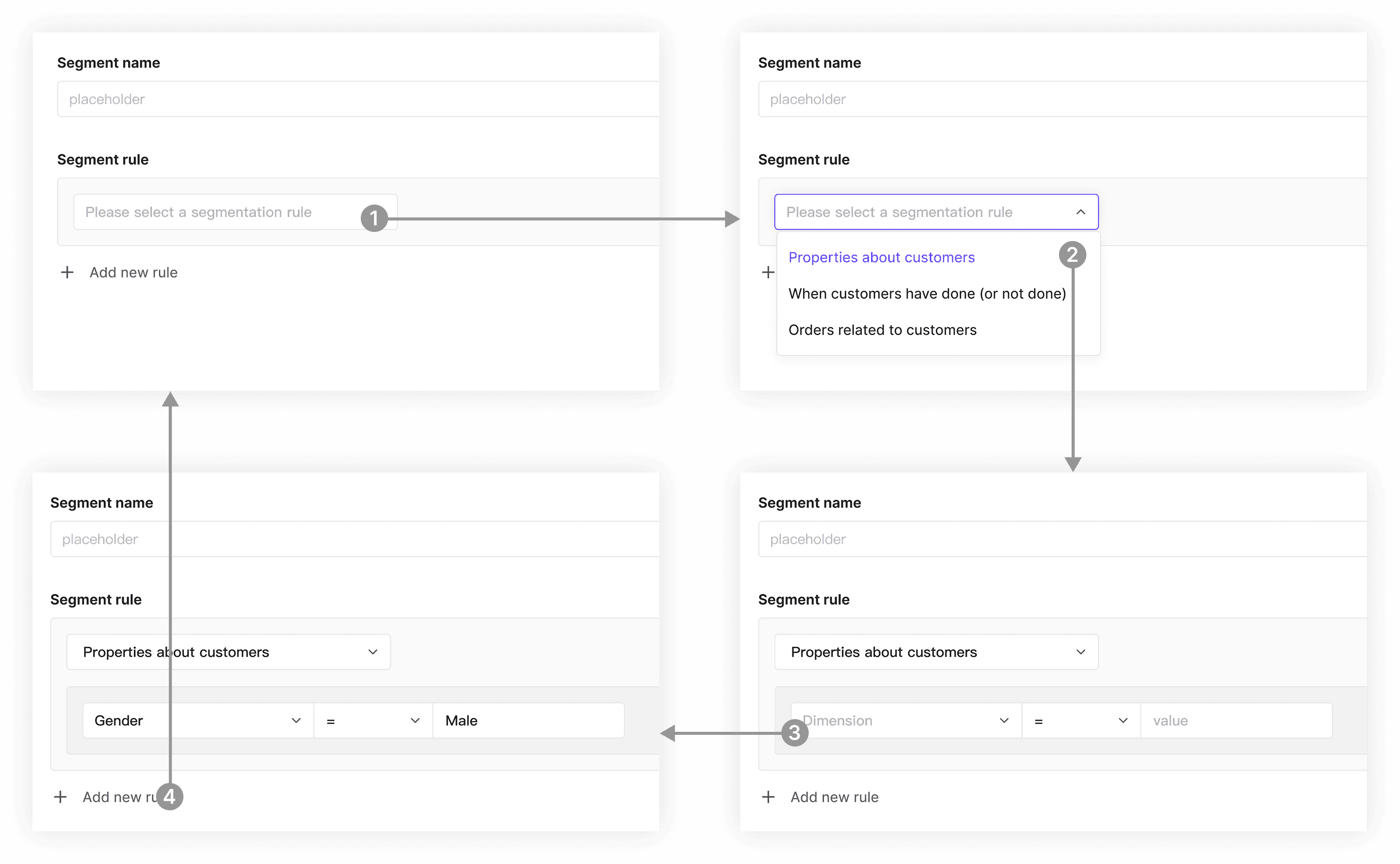
Current segmentation workflow
Current segmentation workflow
The current rule layout creates high cognitive load and slows down review for operators
The current rule layout creates high cognitive load and slows down review for operators
All rules are listed in creation order, regardless of type. When editing a segment, operators must review each previously created rule to check for updates or missing logic. Over time, older rules become harder to locate and understand, increasing cognitive load and slowing down the workflow.
All rules are listed in creation order, regardless of type. When editing a segment, operators must review each previously created rule to check for updates or missing logic. Over time, older rules become harder to locate and understand, increasing cognitive load and slowing down the workflow.

Current page display
Current page display
As a result, users struggle to quickly locate, compare, or edit specific rules. The lack of visual hierarchy and grouping not only impacts readability, but also increases the time needed to complete segmentation tasks.
As a result, users struggle to quickly locate, compare, or edit specific rules. The lack of visual hierarchy and grouping not only impacts readability, but also increases the time needed to complete segmentation tasks.
Solution I
Solution I
Simplified segmentation flow for better clarity and usability
Simplified segmentation flow for better clarity and usability
I redesigned the segmentation workflow to reduce friction and improve clarity—removing the rule selection step, introducing a vertical layout with grouped conditions, and applying conditional displays to streamline the interface. The result: a simpler, more readable process that helps operators complete tasks faster.
I redesigned the segmentation workflow to reduce friction and improve clarity—removing the rule selection step, introducing a vertical layout with grouped conditions, and applying conditional displays to streamline the interface. The result: a simpler, more readable process that helps operators complete tasks faster.
/ 01
/ 01
Fewer steps help operators complete tasks faster
Fewer steps help operators complete tasks faster
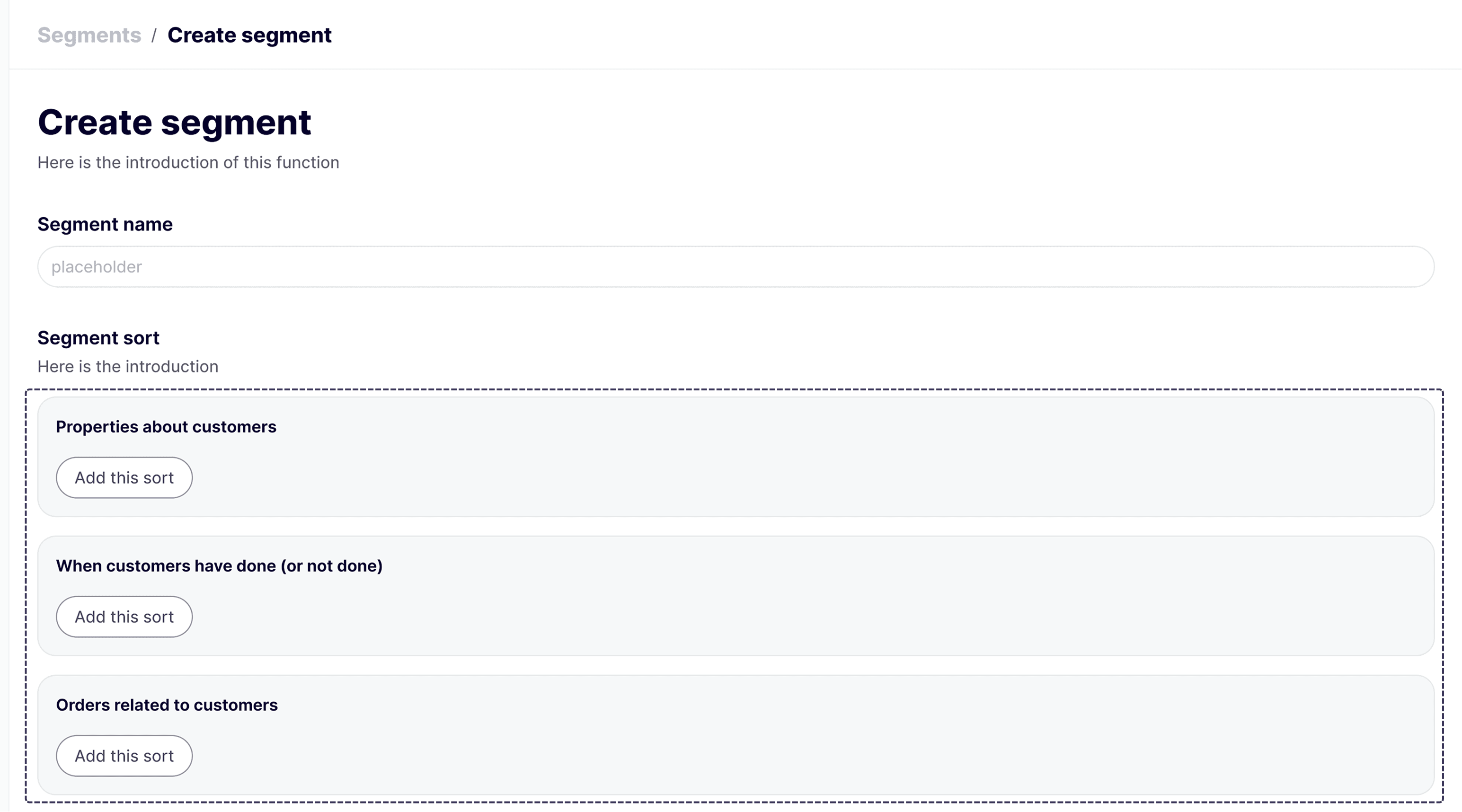
Eliminated the Segment Rule selection box and introduced a vertical layout that displays rules directly on the page. Operators configure rules inline by clicking “Add this sort.”
Eliminated the Segment Rule selection box and introduced a vertical layout that displays rules directly on the page. Operators configure rules inline by clicking “Add this sort.”
/ 02
/ 02
Logical grouping makes long rule sets readable
Logical grouping makes long rule sets readable
Grouped rules in the same category under a single “and,” using nested cards to keep the hierarchy readable.
Grouped rules in the same category under a single “and,” using nested cards to keep the hierarchy readable.

/ 03
/ 03
Progressive disclosure removes friction from event setup
Progressive disclosure removes friction from event setup
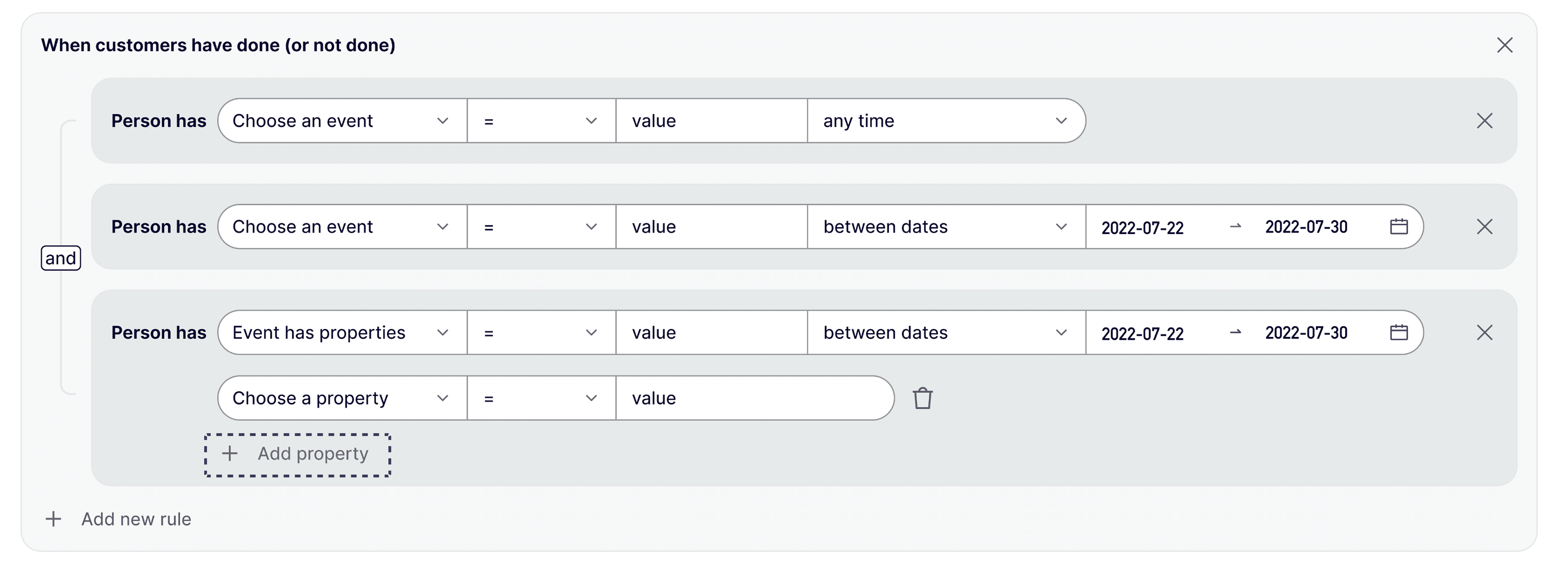
Applied progressive disclosure so “Add property“ appears only when the selected event supports properties and has slots available, cutting unnecessary steps.
Applied progressive disclosure so “Add property“ appears only when the selected event supports properties and has slots available, cutting unnecessary steps.
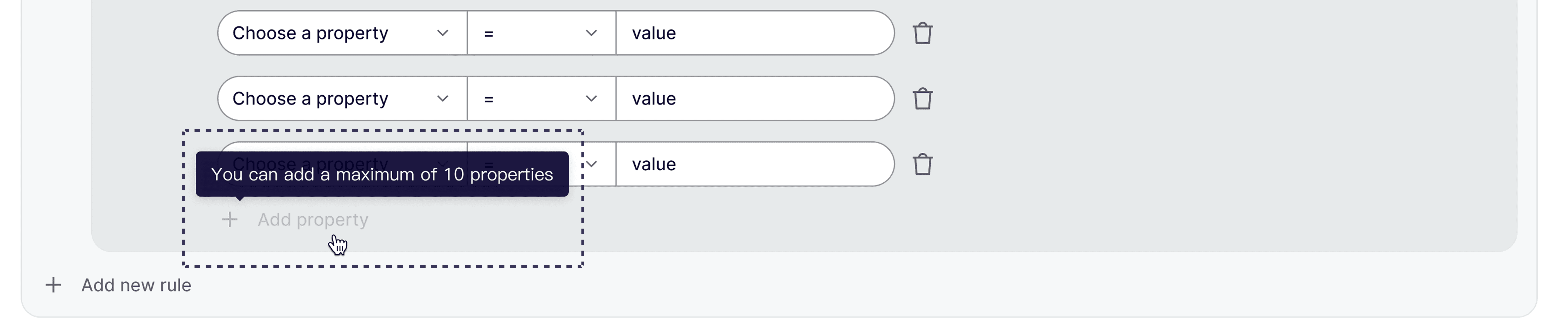
Disabled “Add property” and surfaced a tooltip on hover once a rule reaches its 10-property limit.
Disabled “Add property” and surfaced a tooltip on hover once a rule reaches its 10-property limit.
Scenario Analysis II
Scenario Analysis II
In the View Analytics Reports scenario
In the View Analytics Reports scenario
Users require flexibility, clarity, and efficient cross-view analysis
Users require flexibility, clarity, and efficient cross-view analysis
In the View Analytics Reports scenario, the data analyst takes the lead. They are responsible for creating various reports based on business needs and extracting key data from these reports to support business decisions.
In the View Analytics Reports scenario, the data analyst takes the lead. They are responsible for creating various reports based on business needs and extracting key data from these reports to support business decisions.
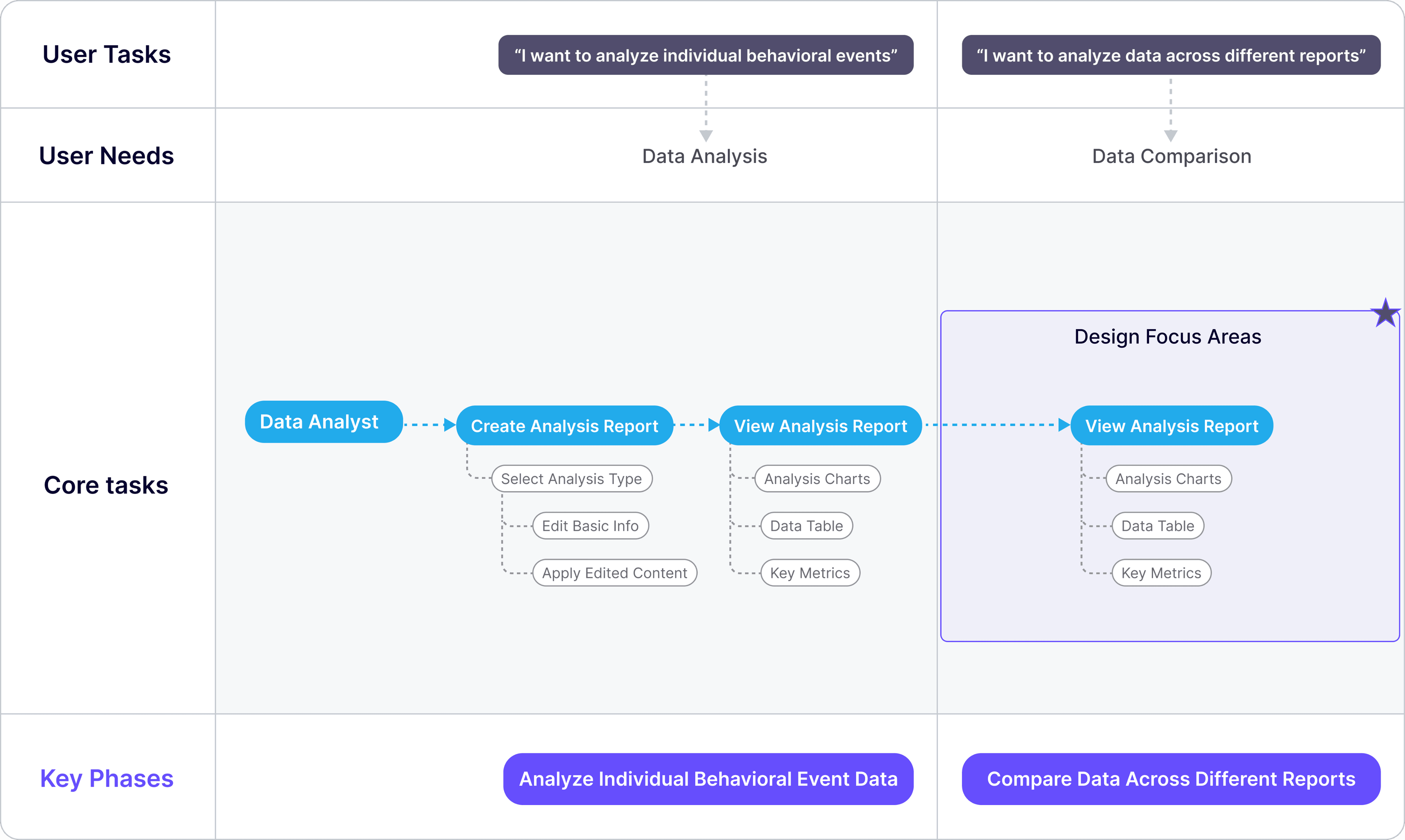
User journey map: View Analytics Reports
User journey map: View Analytics Reports
Problem II
Problem II
Data analysts have no centralized workspace for comparing reports
Data analysts have no centralized workspace for comparing reports
Although data analysts can conduct analysis using the current system, data is scattered across multiple reports and real-time feedback is lacking—making the process inefficient and delaying decision-making.
Although data analysts can conduct analysis using the current system, data is scattered across multiple reports and real-time feedback is lacking—making the process inefficient and delaying decision-making.
Every time I want to compare charts, I have to click back and forth across multiple pages.
Every time I want to compare charts, I have to click back and forth across multiple pages.
Solution II
Solution II
Designing a dashboard MVP for data analysts to address their most pressing pain points
Designing a dashboard MVP for data analysts to address their most pressing pain points
Based on user needs and competitive insights, I led the design of the Dashboard MVP to help data analysts organize and analyze key charts more clearly and flexibly.
Based on user needs and competitive insights, I led the design of the Dashboard MVP to help data analysts organize and analyze key charts more clearly and flexibly.
Under tight timelines and limited resources, I made strategic design trade-offs—removing complexity and prioritizing the most critical pain points. The result was a scalable and efficient workspace that addressed user needs while laying a foundation for future system growth.
Under tight timelines and limited resources, I made strategic design trade-offs—removing complexity and prioritizing the most critical pain points. The result was a scalable and efficient workspace that addressed user needs while laying a foundation for future system growth.

Design System
Design System
Designed 23 core UI components for the product
Designed 23 core UI components for the product
I led the creation of the product’s initial design component library, modularizing common UI elements and interaction patterns. The final output included 23 core UI components along with corresponding usage guidelines.
I led the creation of the product’s initial design component library, modularizing common UI elements and interaction patterns. The final output included 23 core UI components along with corresponding usage guidelines.
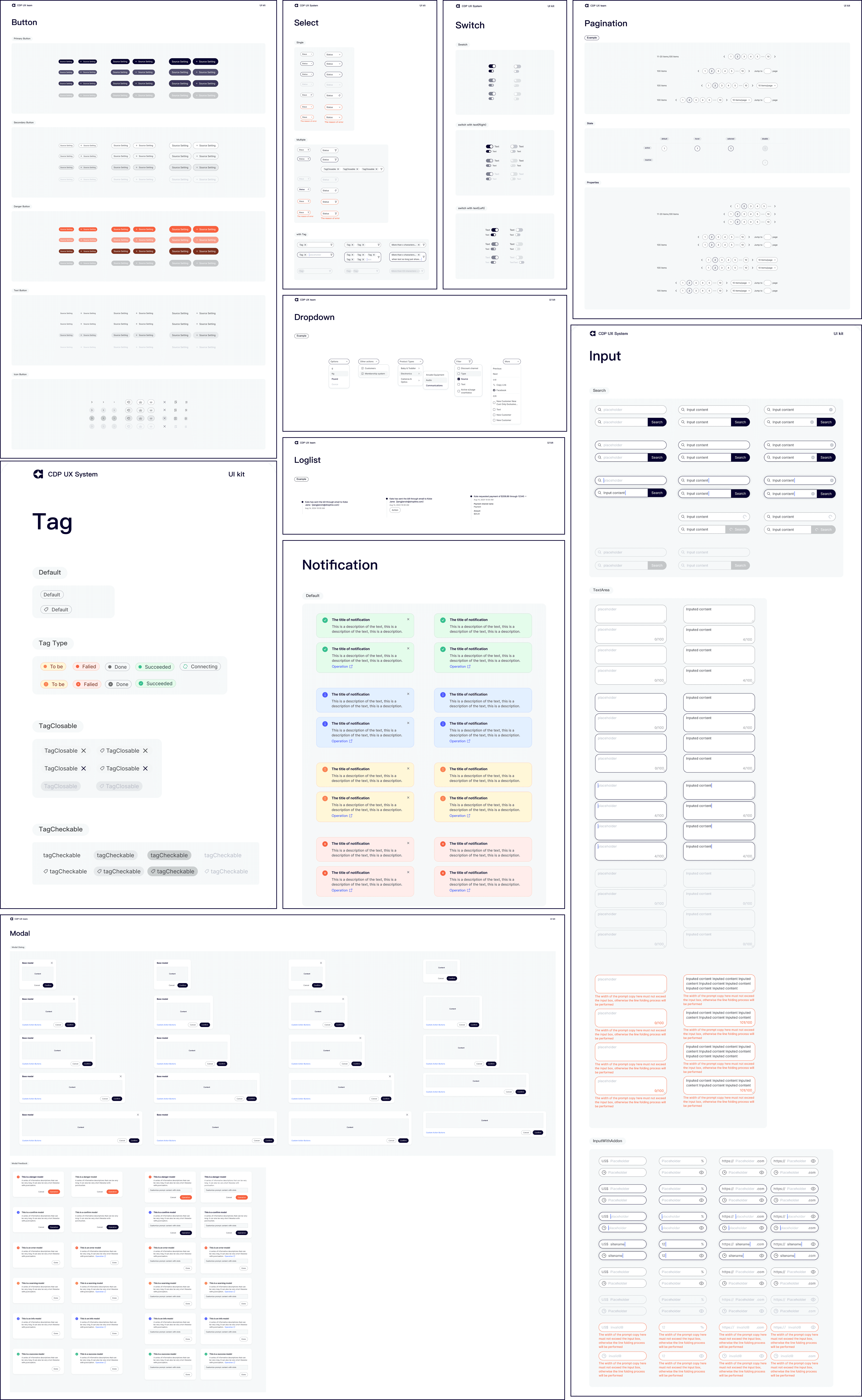
Designed 23 core UI components
Designed 23 core UI components